APP
Application files
The program may be incomplete, damaged, or expecting a different version of its own DLL.
Identify which program or Windows component owns the DLL, follow the safest manual repairs first, or review an optional automatic scan for supported system-file conditions.
DLL files contain reusable instructions required by Windows and installed applications. When a required file is missing, damaged, incompatible, or registered incorrectly, the affected program may fail to start. This guide begins with the safest manual methods and separates optional software recommendations from the repair instructions.
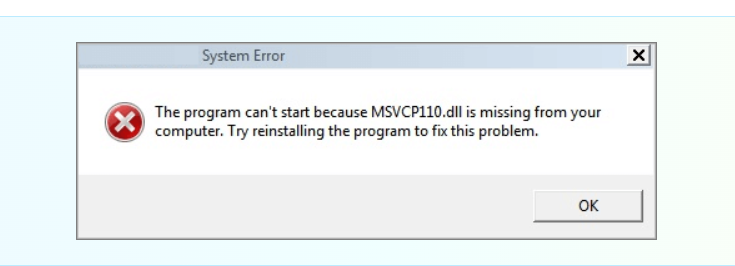
A DLL error is a symptom, not a diagnosis. The correct repair depends on whether the file belongs to Windows, a Microsoft runtime, a device driver, a game, or another application.
The program may be incomplete, damaged, or expecting a different version of its own DLL.
MSVCP, MSVCR, and VCRUNTIME errors often point to a missing or damaged Visual C++ runtime package.
Interrupted updates, disk errors, or corruption can affect protected DLL files that belong to Windows.
Start by identifying the DLL owner. Never replace a protected file with an unknown download simply because the filename matches.
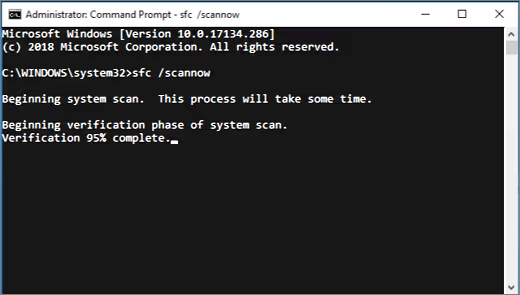
sfc /scannow. If Windows reports unrepaired corruption, run the appropriate DISM health-restore command before repeating SFC.
If you prefer an automated check, you may review independently developed software that scans for supported missing, corrupted, incompatible, or conflicting DLL conditions. It cannot repair failed hardware or guarantee every application-specific DLL problem.
Return to the free instructions and work through each check yourself.
Before activation, this section will identify Advanced System Repair as independently developed software, explain the affiliate relationship, describe supported DLL and system-file conditions, and disclose free-versus-paid functionality and current subscription terms.
Results depend on the actual cause of the problem. Diagnose hardware and account-related issues separately.
Clear answers about the guide, repair scope, and our relationship with software publishers.
PCRepairs.net is an independent PC-repair information website and is not the official Advanced System Repair product website. PCRepairs.net may participate in an affiliate marketing relationship with Advanced System Repair and may earn a commission from qualifying purchases made through clearly identified affiliate links. Affiliate compensation does not mean that Advanced System Repair controls our repair guides or removes our responsibility to explain product limitations accurately. Read our Affiliate Disclosure.
No. PCRepairs.net is an independent informational website. It is not Microsoft support and is not owned by, affiliated with, or endorsed by Microsoft. Microsoft and Windows are trademarks of the Microsoft group of companies.
No. We publish educational repair information and may review software tools. We do not access your computer, manage Microsoft accounts, reset third-party passwords, or represent a product manufacturer.
No. Software cannot physically repair a failed drive, damaged memory, overheating component, broken connector, or liquid damage. Those conditions may require qualified local hardware service.
No. Similar symptoms can have different causes, and no repair method can guarantee success in every case. Back up important files and use the safest reversible steps first.
Some software links may be affiliate links. If a reader purchases through a disclosed affiliate link, PCRepairs.net may earn a commission. Affiliate compensation does not remove our responsibility to describe the product and its limitations accurately.
PCRepairs.net publishes general PC-repair information. We are not Microsoft support, and we do not imply that Microsoft endorses this website or any independently developed product reviewed here.
Before a software recommendation is activated, this section will identify the developer, the affiliate relationship, supported features, free-versus-paid functionality, subscription terms, cancellation information, and the destination domain.